Autel MaxiTPMS TBE200E Tire Tread and Brake Disc Wear Examiner
The MaxiTPMS TBE200E is a laser-enabled tire tread depth & brake disc wear examiner that provides users with quick and accurate wear measurements. It features a 1.65” AMOLED super retina touchscreen, displaying measurement data curves in real-time. The TBE200E dual cameras enable users to document tire wear and damage and scan the Tire Identification Number (TIN). Use the tool separately, or with ITS600 to view and print detailed TPMS reports.
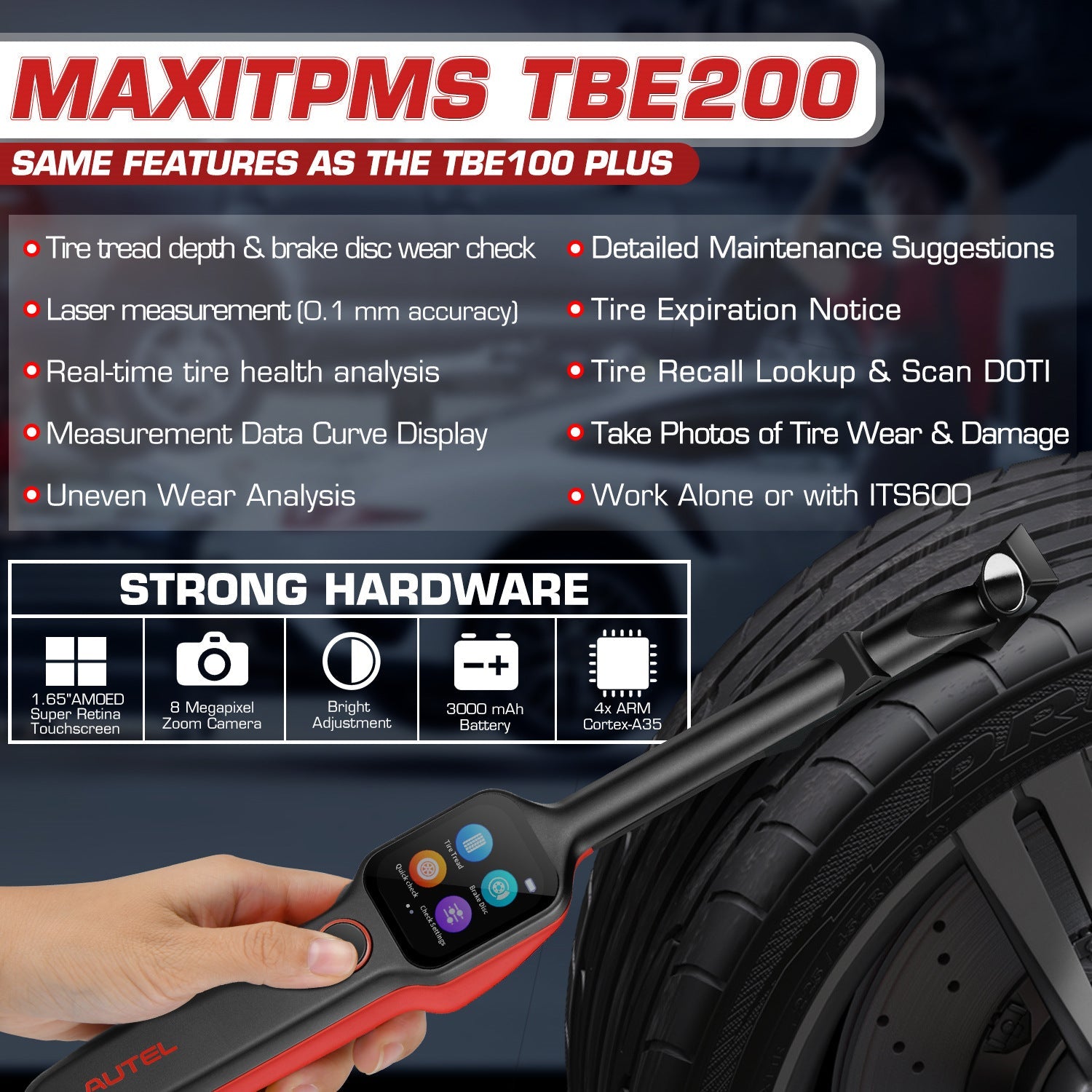
Autel MaxiTPMS TBE200E TPMS Functions
- Real-time measurement data on touchscreen
- Measurement data curve display
- Uneven wear analysis
- Test detail for single tire tread/brake disc
- Detailed replacement & maintenance suggestions (tire/brake disc replacement, tire rotation/alignment servicing)
- Scan DOT, tire expiration notice, tire recall lookup
- Take photos of tire wear & damage
Tire Tread Depth & Brake Disc Wear Meet Your Needs
1. Tire Tread Depth:
Using laser technology, the Tire Tread application analyzes the wear of the tires on vehicles with no need to remove the tires. Place the tool on the tire, and the tool projects a laser beam. The wear measurement is then sent to the display screen with an accuracy within 0.1mm. Measurements are also displayed graphically. The Tire Tread application provides two types of checks: “All Treads” and “Single.” When using this application, a message will display prompting the user to choose between the current mode and the alternative one.

2. Brake Disc Check:
The MaxiTPMS TBE200 laser-enabled tool examines brake disc wear quickly and accurately. You can examine the wear status of a brake disc without the need to remove tires. Measurements are displayed graphically. The Brake Disc function not only provides brake disc wear measurements but also offers analysis to ensure driving safety.

Features:
1. Laser Measurement – Make Sure Quick and Accurate Tests
With laser technology, the tire tread application analyzes the wear of the tires on vehicles with no need to remove the tires. Place the tool on the tire, it will project a laser beam, and display real-time data.
Unlike other tire & disc examiners, which need to dismantle the tire before the test, or use the tool to test over different parts of the tire several times to get a result, the laser measurement technology enables the TPMS tool TBE200E to test the tire and disc without removing the tires and do uneven analyses.
The wear measurement tool Autel MaxiTPMS TBE200E will measure the tire depth and disc and then send the results to the display screen with an accuracy within 0.1mm, providing technicians or DIYers with the maximum precise test results. Measurements are also displayed graphically for a quick and clear results analysis.
Your MaxiTPMS TBE200E laser-enabled tool examines brake disc wear and tire depth both quickly and accurately. Once the laser beam is shot out, the TPMS tool will measure the tire status immediately and show the real-time data to the screen.

2. Tire Status Analysis– Get Comprehensive Tire Depth & Disc Measurement Results
- Real-Time Measurement Data Display:
Technicians or DIYers just need to place the tool on the tire surface, and disc surface, pressing the Power/ Measure button to take measurements for each tire and the real-time measurement data will appear on the screen with wear status illustrated in different colors.
Autel MaxiTPMS TBE200E can measure each tire wear status, which helps users process the uneven wear analysis and detect the issues such as abnormal tire pressure, tire dynamic balance issues, four-wheel alignment issues, or suspension problems in time.
- Single or All Tire Tread/ Brake disc:
There are two check modes available under the tire tread application: Single Check helps measure the wear of each tire on the vehicle by examining the tread depth in the center area of the tire only. All Tread Check: The All Tread checks your tire wears in three separate areas (outer, center, and inner) for a more comprehensive analysis.
- Replacement & Maintenance Suggestions:
The TPMS tool TBE200E provides mechanics or DIYers tire replacement or maintenance suggestions in detail after finishing the measurement to save your time for troubleshooting and help the tires on the vehicles perform at their optimum level.

3. Extended Tire Services - Ease Your TPMS Repair Work
Mechanics can use the TPMS tool TBE200E to scan or manually enter the tire DOT serial number located on the sidewall to read the information such as the tire's origin information and factory code, the last four digits are the tire's production date, and acquire basic tire characteristics such as tire recall (American region only) and tire age.
- Tire Expiration Notice and Tire Recall Lookup:
The tire could be expired for a long time of no use, use the scan function, and technicians can get the tire expiration notice to get such information. TBE200E will also display tire recall lookup launched by the manufacturers to avoid safety issues.
- Take Photos of Tire Wear & Damage:
The TPMS tool TBE200E's dual cameras (CMOS WXGA, 1 megapixel & 8 megapixels, 30fps) not only enable users to scan Tire Identification Number (TIN) but also document tire wear and damage for better analysis of the tire issue.
Data Query And Printing
The Data Query function stores the results of the latest measurement session. After the tool is connected with the ITS600/ITS600 Pro tablet, the measurements of the previous session will display on the tablet screen automatically. Once a new measuring session starts, the previous test results will be replaced by new results.
You can also print the test report by connecting the TB200E to ITS600.

Covering 99% of tires in the market
Autel maxitpms tire tread and brake disc wear examiner TBE200 (E) is compatible with 99% vehicle tires on the market including:
- all types of passenger cars
- commercial vehicles (trucks, heavy trucks, buses)
- off-road vehicles
- motorcycle
- more.
With this distinguished laser tire health diagnosis tool, you can figure out all the questions about the tire and to ensure safe driving all the time.

How to Use Autel MaxiTPMS TBE200
Autel MaxiTPMS TBE200 one-button operation, easy to use.
STEP 1: Long press the power button to turn on the tool.
STEP 2: Perform Tire Tread Check: On the Main Job screen, tap the Tread Check icon, and place the tool on the tire surface. Short press the power button. Ensure the laser line is perpendicular to the channels of the tire. The screen will display real-time measurement data, slide left to view details.
STEP 3: Possible Results for Measurements: Wear status is represented by icon color: A gray icon indicates the tire is untested; green indicates the tire is in good condition; yellow indicates a replacement is recommended; red indicates immediate replacement is recommended.
STEP4: Calibration: On the Main Job screen, tap the Calibration
icon, and place the magnetic head on the calibration table. Press the power button to start. Wait for 1-2 minutes until calibration is complete.
Calibration frequency: Calibration is recommended every two months. Immediate calibration should be performed if deviations are detected or if the tool is dropped or in some manner mishandled.

Free Worldwide Shipping

Where is my order shipped from?
We provide worldwide free shipping! And all orders will be shipped from the warehouse nearest to you and carried by DHL, FedEx, UPS, USPS, DPD, or Royal Mail according your address. Following is the location where our warehouse located at and estimate develiry date for reference.
| Your Address |
Shipping Location |
Delivery Estimated |
| United States/ Canada |
CA, US |
NJ, US |
3-5 Days |
| Europe |
Germany |
5-7 Days |
| United Kingdom |
Leicestershire, UK |
5-7 Days |
| Australia |
Sydney, AU |
7- 10 Days |
| Other Countries |
HongKong |
7-15 Days |
Order Processing Time
All our order are processed and shipped out within 24 hours (excluding weekends and holidays).
After the order is shipped out and received by the carrier, we will update you by email with a Track-and-Trace code with which you can follow your package and see the remaining shipping time.
Please allow 24-48 hours for the tracking information to update.
Shipping Address Change
If you would like to change the shipping address for your order, please contact us by email with the new shipping address. Once the order is shipped, we can not alter the shipping address anymore.
International Shipping Duties & Taxes
- For international order. If the items don't ship from your local warehouse in your country/ region, you, the customer, will be responsible for the import duty, but please don't worry, We will decrease the declared value to reduce your import tax.
For more details of the Import Tax, please visit Import Duty
Returns, Refunds, and Exchanges
We provide a 30-Day Returns Service after delivery, If you are not satisfied with the item you bought or change your mind, please contact us for a return shipping address and ship all the items back to us for a refund in their original package.
For more details of the return policy, please visit our Return Policy




![IM608 PRO II Full Kit<br>[2-Year Free Update]](http://www.obdprice.com/cdn/shop/files/Autel_IM608S_II_Full_Kit_1_600x600.webp?v=1755662636)

![IM508S PRO<br>[2-Year Free Update]](http://www.obdprice.com/cdn/shop/files/Autel_MaxiIM_IM508S_Pro_600x600.webp?v=1755662755)
![IM508S<br>[2-Year Free Update]](http://www.obdprice.com/cdn/shop/files/AUTEL_MAXIIM_IM508S_600x600.webp?v=1755662895)