




![IM608 PRO II Full Kit<br>[2-Year Free Update]](http://www.obdprice.com/cdn/shop/files/Autel_IM608S_II_Full_Kit_1_600x600.webp?v=1755662636)

![IM508S PRO<br>[2-Year Free Update]](http://www.obdprice.com/cdn/shop/files/Autel_MaxiIM_IM508S_Pro_600x600.webp?v=1755662755)
![IM508S<br>[2-Year Free Update]](http://www.obdprice.com/cdn/shop/files/AUTEL_MAXIIM_IM508S_600x600.webp?v=1755662895)









Tire pressure monitoring systems play a crucial role in automobiles; they use tire pressure sensors to monitor tire conditions in real time, ensuring driving safety. TPMS tools have not only become essential equipment for major repair shops but are also important tools for car owners in their daily vehicle maintenance.
There is a wide variety of TPMS tools available on the market, with well-known brands including Foxwell, Launch, and Autel. In a previous article, we introduced eight of the best TPMS programming tools from various brands. Today, we’ll focus primarily on TPMS tools from Autel.
Autel is one of the world’s leading manufacturers and suppliers of professional automotive aftermarket diagnostic tools and comprehensive TPMS solutions. Previously, we compiled a detailed comparison chart of all Autel TPMS tools, including professional TPMS tools as well as full-system automotive diagnostic tools.
The Autel TS501 Pro and Autel TS508WF are very popular TPMS tools on the market. So, what are the differences between these two Autel TPMS tools? How should you choose between them? We hope this article provides the answers you’re looking for.

What do You Consider When Choosing a TPMS Tool?
There is a wide variety of TPMS tools available, including wireless and wired models, those with and without screens, and those that support TPMS reset and relearning. Some even offer full-system diagnostic capabilities. When faced with these different brands, designs, and functional requirements, we need to consider multiple factors comprehensively to choose the TPMS tool that best suits our needs.
Before we conduct a detailed comparison of the Autel TS501 Pro and TS508WF, you should first consider the following factors as a whole to help you make a more informed decision:
-
Vehicle Coverage
Before purchasing a TPMS tool, the first thing to consider is vehicle compatibility. If you buy an Autel TPMS tool that isn’t compatible with your vehicle, it’s no better than a brick. Whether you’re buying it for personal use or for a repair shop, a tool that supports TPMS systems from a wide variety of brands is essential. -
TPMS Functional Requirements
After considering the device’s coverage range, another thing you need to think about is what you plan to use this TPMS tool for. Will you use it solely to read tire pressure data, or do you also need to perform operations such as TPMS reset, re-learning, and programming tire pressure sensors? Or perhaps you need all of these features. This is one of the key factors you need to consider. -
Easy to use
This detail might seem confusing, but it is indeed an important factor. An easy-to-use TPMS tool not only needs an intuitive interface and simple operating procedures, but should also offer a good user experience. At the same time, hardware design elements such as buttons and screens also affect ease of use. -
Software Updates and Technical Support
Regular software updates and technical support are essential for maintaining the performance and functionality of TPMS tools, ensuring they remain compatible with the latest vehicle technologies and regulatory requirements. At the same time, the method and frequency of updates also affect the tool’s usability. Some Autel TPMS tools support Wi-Fi software updates, while others are updated via a USB connection.
Autel TS508WF Wi-Fi Update
-
Price and Value
Finally, the factors you need to consider are price and value for money. When choosing a TPMS tool, if the product you have in mind already meets the criteria listed above, then price and value for money become the deciding factors. You should choose the product with the most comprehensive features and best performance within your budget.
How to Check the Vehicle Coverage for the Autel TS501 PRO and TS508WF
Now that we’ve identified the factors to consider, let’s take a look at the vehicle compatibility of the Autel TS501 Pro and the Autel TS508WF. If your vehicle isn’t compatible with one of them, congratulations—you’ve already narrowed down your choice of TPMS tool at this stage.
However, for repair shops, the wider the vehicle coverage, the better, as this ensures that the tools can be used on a wider variety of vehicle makes and models. So how can you check the vehicle coverage of these two Autel TPMS tools?
Method 1: Check the Autel Official Website
The easiest way is to visit Autel’s official website and check vehicle compatibility information via the “Vehicle Coverage” link. However, this method requires you to know the specific make and model of the vehicle.
This link offers two ways to check compatibility. One is to select either TS501 Pro or TS508WF in the “Other Tools” section, where you can find the corresponding vehicle compatibility information. Unfortunately, I didn’t see the TS501 Pro option in this method, but you can refer to the TS501 compatibility information—since the TS501 Pro is an upgraded version, its compatibility is likely even broader.

Another method is also available on this webpage, but in a different section—“TPMS Tools.” The search function in this section is better suited for individual buyers, as it requires specific information such as the vehicle make and model year; however, the search results are more comprehensive and detailed, and include information on feature support.

Method 2: Contact Autel Support
You may also find that conducting your own searches is often inconvenient. The most direct approach is to contact Autel’s customer support, as they can provide you with more detailed and accurate vehicle compatibility information. You can also contact our customer service representatives directly via the link in the lower-right corner of the OBDPRICE page; we’d be happy to provide you with professional assistance.

Contact us with page assistant
Autel TS501 Pro vs. TS508WF: TPMS Function Comparison
If you’ve tried the first step but haven’t found the answer yet, this is the place to be. Given the broad compatibility of Autel TPMS tools, you’ll find that both models easily cover your vehicle or business needs. Next, let’s compare the functional differences between these two tools.
| Comparison | TS501 Pro | TS508WF |
| TPMS function | ||
| Easy vehicle identification | (Manuallyselect) | (Manuallyselect) |
| Quick Mode&Advance Mode | × | ● |
| Activate TPMS sensors | ● | ● |
| Read sensor data | ● | ● |
| TPMS diagnose,one step for complete TPMS health check | ● | ● |
| Read/clear TPMS DTCs;on-screen DTC description | ● | ● |
| Scan TPMS sensor ID and copy ID into MX-Sensor | ● | ● |
| Manual input OE ID into MX-sensor | ● | ● |
| Program MX-Sensor by auto creating sensor ID | ● | ● |
| Read Sensor ID by OBD and copy ID into MX-Sensor | ● | ● |
| Relearn by OBD function | ● | ● |
| Relearn procedure guide on the tool | ● | ● |
| Check Key FOB | ● | ● |
| Read TPMS live data | × | × |
| Tire Type/Pressure selection | ● | ● |
| DOT Scan,Tire Expiration Notice,Tire Recall Lookup | × | × |
| TPMS Toolkit(otherfunction) | ● | ● |
As shown in the table, the Autel TS508WF and TS501 Pro share many similarities in terms of TPMS functionality—such as reading sensor data, activating TPMS sensors, programming TPMS sensors, and scanning TPMS sensor IDs to clone them onto MX sensors. These functions are more than sufficient for routine TPMS maintenance; whether you are replacing TPMS sensors or need to perform diagnostics, both devices can meet your needs.
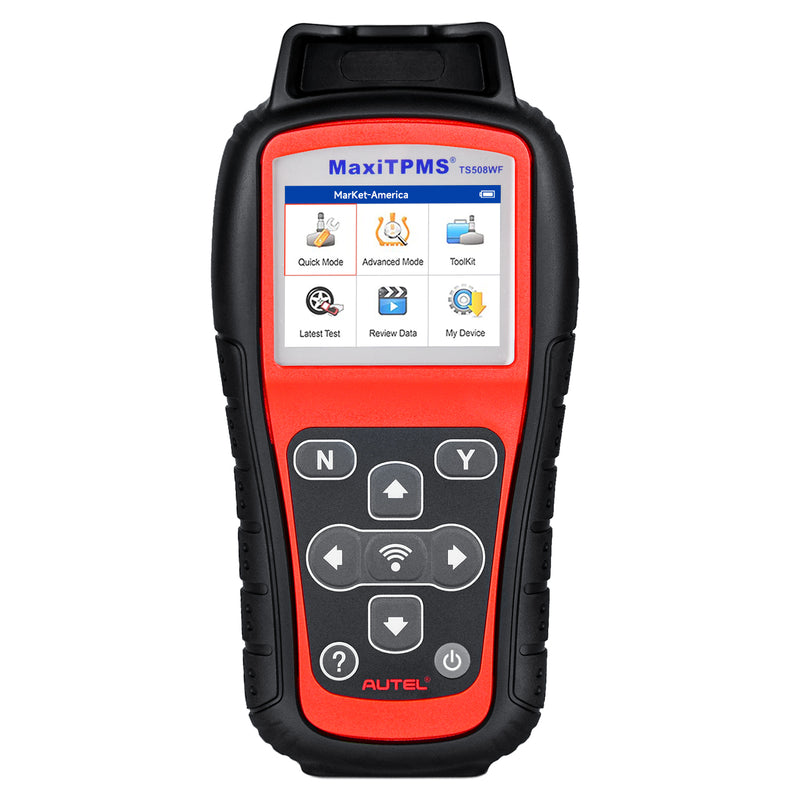
Despite the many similarities between the two Autel TPMS tools, there is one key difference: the Autel TS508WF builds upon the TS501 Pro by adding "Quick Mode" and "Advanced Mode," enabling faster and more efficient troubleshooting and repair of tire pressure monitoring systems.
Autel TS501 Pro vs. TS508WF: Which One Is Easier to Use?
In the previous step, we thoroughly compared the TPMS features of the two tools, which may have made your decision even harder because so many of their features are so similar. Don’t worry—next, we’ll compare their ease of use to see which one better suits your usage habits and needs.
Let's take a look at a comparison of the appearance and hardware specifications of these two Autel TPMS tools:
| Hardware Feature | MaxiTPMS TS501 PRO | MaxiTPMS TS508WF |
|---|---|---|
| Image | 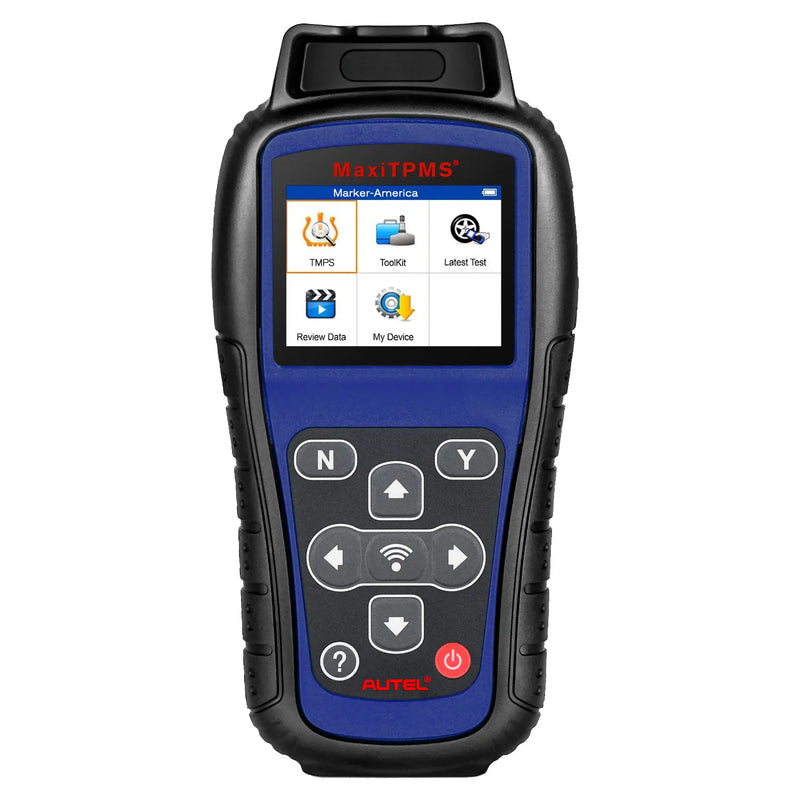 |
 |
| Display |
TFT color display (320 x 240 dpi) |
TFT color display (320 x 240 dpi) |
| Battery Capacity |
3.7V Li-polymer battery 2400mAh |
3.7V Li-polymer battery 3200mAh |
| Connectivity | Mini USB 2.0 | Mini USB 2.0 |
| Dimensions | 202.2 x 106.7 x 37.7 mm (7.96" x 4.20" x 1.48") | 215 x 105 x 37 mm (8.46" x 4.13" x 1.46") |
| Weight | 0.4 kg (0.88 lb.) | 0.39 kg (0.86 lb.) |
| Warranty | 1 Year | 1 Year |
| Software Updates | Lifetime Free | Lifetime Free |
The specifications table allows us to further compare the ease of use of these two TPMS tools. Although both tools have the same screen size, the TS508WF is slightly larger in overall dimensions. While the colors differ, the overall design—including button placement and materials—is consistent between the two. It’s hard to tell from this which one is easier to use.
In terms of battery capacity, the Autel TS508WF clearly has the advantage; this typically translates to longer usage times and less frequent charging, thereby enhancing the user experience.
In terms of ease of use, the Autel TS508WF wins by a narrow margin.
Autel TS501 Pro vs. TS508WF: Software Update Differences
Next, we move to the fourth comparison: the differences in software updates between the Autel TS501 Pro and the TS508WF. Since both TPMS tools are Autel products, they share the same technical support, offering free, fast, and professional customer service.
As shown in the specification comparison table in the previous section, both tools offer free lifetime software updates, which means users can continue to receive the latest features and improvements without incurring any additional costs.
However, when it comes to software updates, the Autel TS508WF offers a more convenient method: users can download and install the latest software updates directly on the device via Wi-Fi, whereas the TS501 Pro requires updates to be performed via a computer, which adds a certain degree of complexity to the user experience.
In this comparison, the Autel TS508WF comes out on top by offering greater convenience regarding software updates.

Lifetime Free Software Updates
Autel TS501 Pro vs. TS508WF: Cost-Performance Comparison
Price:
- Autel MaxiTPMS TS501 Pro: $189
- Autel MaxiTPMS TS508WF: $239
The price difference between these two Autel TPMS tools is only $50, but the Autel TS508WF offers more advantages in terms of features and user experience, making it a better value. Of course, if these advantages aren’t important to you, the TS501 Pro is also a good choice.
Which One Should You Choose?
That concludes our comparison. Do you now have a clearer idea of which TPMS tool to choose? As we all know, every tool has its pros and cons, and the choice ultimately depends on your specific needs and usage scenarios. Regarding the Autel TS508WF and TS501 Pro, I’d like to say:
- If you're a DIY enthusiast who just wants a TPMS tool on hand for everyday use, the TS501 Pro might be a better fit for you, as it's more affordable and offers enough features to meet your basic needs.
- However, if you run a repair shop, the extra $50 for the TS508WF is well worth it, as it offers a more convenient way to update the software and longer battery life, which can save a lot of time and improve efficiency in your day-to-day work.


