











Vehicle trouble codes are similar to abnormal readings on your medical report—different values indicate potential problems in different areas. The P1000 code is a manufacturer-specific code, and its definition may vary by manufacturer. In Ford vehicles, a P1000 code indicates that an OBD-II monitoring test was not completed or that there was a fault in the OBD-II driving cycle.
There are many possible causes for the Ford P1000 code. Read our guide on the Ford P1000 code meaning and common causes here. Often, this trouble code will clear on its own after driving for a while. But what should you do next if the P1000 code persists even after driving normally or attempting a driving cycle?
In short, the answer to this question is: The next step is to identify which monitoring task has not been completed and why it did not run. Once you’ve identified the specific monitoring task and the reason it didn’t run, it’s very simple to take the appropriate action. This article will walk you through the specific steps in detail.

Before Driving Again, Find Out What Is Still Not Ready
Check Individual Monitors, Not Just the P1000 Code
If the P1000 code persists after you use an automotive diagnostic scanner, the display will simply indicate "On-Board Diagnostic (OBD) system readiness test incomplete" without specifying which monitor is not ready. Therefore, you first need to check the individual monitors.
To check the readiness status of the monitors, use the Autel scan tool and access the I/M Readiness function. You need to review the status of each monitor to determine the next steps in your troubleshooting process; otherwise, you’ll be running around aimlessly, with no clear direction.
Separate “Not Ready” From “Not Supported”
Once you have completed the previous step, the first thing you need to determine is the meaning of the status symbols displayed in the "Status" column for these individual monitors. This allows you to quickly identify monitors that are not yet ready and avoid waiting for tests that the vehicle does not support. For example, on the Autel scan tool, you might see:
- ✔ / OK: Indicates that a particular monitor being checked has completed its diagnostic testing
- ✘ / INC: Indicates that a particular monitor being checked has not completed its diagnostic testing
- ⊘ / N/A: The monitor is not supported on the vehicle. The green, yellow and red LEDs provide a quick way to help you determine if a vehicle is ready for an Emission Test.

Taking the image above as an example, it indicates that the EVAP system is not yet ready, whereas the CCM, CAT, and oxygen sensors are all ready; therefore, the next step is to focus troubleshooting efforts on the EVAP system to identify any potential faults.
Check for Other Stored and Pending Codes
In addition, if you retrieve more than one trouble code (other than P1000), you should check whether these codes might be preventing any pending diagnostic tests from running. You should also review the freeze frame data, which records the operating conditions at the time the fault occurred and can help troubleshoot the issue.
For example, a malfunction in the oxygen sensor heater may affect related monitoring, while abnormal engine temperature could prevent certain tests from meeting the conditions required for initiation.
You can use the table below to quickly determine the next steps for troubleshooting based on the number of unready monitors and the presence of other error codes:
| Scan Results | What to Check Next |
| Several supported monitors are incomplete | Check for a recent reset and confirm that the required starting and driving conditions have been met. |
| Only one supported monitor is incomplete | Check the enabling conditions for that specific monitor using information for your Ford’s year and engine. |
| Other stored or pending codes are present | Investigate related faults that could prevent monitor completion. |
| All supported monitors are complete | Check whether codes were cleared, the battery was disconnected, or the PCM was reset. If none occurred, investigate possible power interruptions. |
Compare Readiness Before and After the Drive Cycle
Use the readiness results you saved earlier as a baseline. After completing the drive cycle for your Ford—including any required key-off or soak period—park the vehicle and reopen I/M Readiness on your Autel scan tool. Use the same readiness view and do not clear codes between checks.
Note which monitors changed to Complete, which remain Incomplete, and whether new stored or pending codes appeared. If only one monitor remains incomplete, focus on its enabling conditions and related faults. If previously completed monitors become incomplete again, check for code clearing, a PCM reset, or a power interruption.
If Several Monitors Stay Not Ready, Check for a Reset or Missing Conditions
If multiple monitors fail to become ready, check whether a reset has recently occurred and confirm that the required startup and driving conditions are met.
Has Readiness Been Reset Since Your Last Drive?
If several monitors remain incomplete, check whether readiness was reset after your last drive. Clearing trouble codes, disconnecting the battery, or certain PCM service procedures can erase previous progress and require the monitors to run again.
Compare your latest Autel readiness results with the earlier record. If monitors that were complete now show incomplete, review any repairs, battery work, or scanner operations performed between checks. If no reset is known, inspect battery connections and investigate possible power interruptions.
Once the cause is addressed, save a new baseline and follow the correct drive cycle without clearing codes again.
Did Your Driving Match the Procedure for Your Ford?
Different car brands and models have varying requirements for driving cycles. Please consult Ford technical documentation to determine the correct driving cycle procedure. Simply driving at high speeds or failing to follow the required procedures does not constitute a complete driving cycle.
Repeat this procedure in accordance with the professional driving cycle requirements to see if the Ford P1000 code clears.
If Only the EVAP Monitor Is Not Ready, Check These Conditions
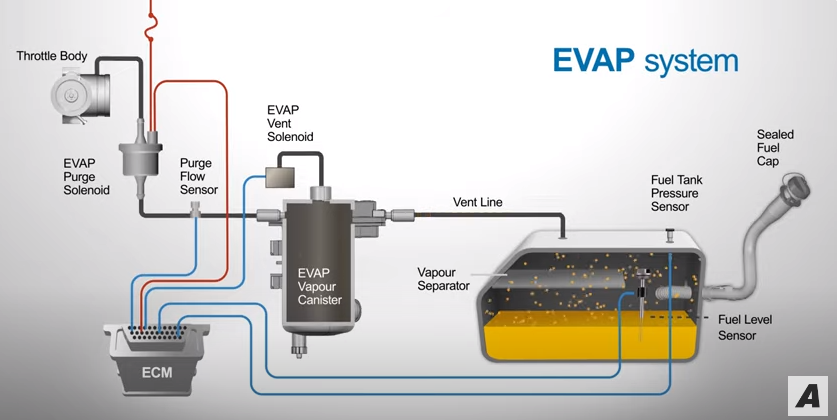
If your Autel scanner shows that EVAP is the only incomplete monitor, check its operating requirements before assuming there is a leak. The EVAP monitor needs specific conditions to run, and extra highway miles may not satisfy them.
Fuel Level and Ambient Temperature
Check the fuel-level and temperature requirements for your Ford’s year and engine. A tank that is too full or too empty, or temperatures outside the permitted range, may prevent the test from running. Avoid applying one fuel-level percentage or temperature range to every Ford.
Required Soak Time and Key-Off Testing
Some EVAP strategies require a cold start after a specified soak period; others involve testing after the engine is switched off. Follow the procedure for your vehicle, including any required parking time. Repeated short trips or hot restarts may leave the necessary conditions unmet.
Related EVAP Codes and Further Testing
Check your Autel scanner for stored and pending EVAP codes. If any are present, save them and investigate the related fault. “Not Ready” alone does not prove a leak or a failed purge valve.
If the required conditions have been met repeatedly but EVAP remains incomplete, further diagnosis may be needed. A compatible Autel tool can assist with supported live data and active tests, but available functions depend on the vehicle. Active tests do not automatically make the monitor ready.
If Catalyst or Oxygen Sensor Monitors Stay Not Ready
If catalyst or oxygen sensor monitors remain incomplete, check operating conditions and related faults before replacing parts. “Not Ready” means the test has not completed; it does not identify a failed catalytic converter or sensor.
Check Warm-Up and Related Fault Codes First
Confirm that the engine reaches its expected operating temperature using coolant temperature data on your Autel scanner. Then review stored and pending codes for relevant issues, such as oxygen sensor heater faults, misfires, or fuel-control problems. Depending on the vehicle, these faults may prevent related monitors from completing.
Use Live Data to Guide Further Checks
Review supported oxygen sensor or air-fuel sensor readings alongside fuel-system status and fuel trims. Look for patterns that warrant further testing, rather than diagnosing a part from one reading. Sensor types and expected behavior vary, so use information for your Ford’s year and engine.

Review Supported On-Board Monitor Test Results
If your scanner and vehicle support on-board monitor test results, these may provide additional diagnostic clues. Verify which test the results describe and whether it has run since the last reset. An incomplete readiness status and a failed test result mean different things; interpret them together with related codes and live data.
Which Autel Features—and Models—Help With the Next Step?
There is a wide variety of Autel scan tools available. What roles do their features play during the diagnostic process? Here, we recommend two Autel scanners, the Autel AL519 and MK808Z, and briefly explain how each can help diagnose and troubleshoot vehicle issues.
Autel AL519 for Readiness Checks and Basic Engine Data
Key Features:
- Works on most 1996 and newer vehicles(OBDII & CAN)-domestic and import
- Features the unique patented One-Click I/M Readiness Key
- Reads live PCM datastream, live O2 sensor test data, freeze frame data
- Displays monitor and I/M readiness status (emissions)
- Turns off Check Engine Light (MIL), clears codes and resets monitors
- ...
Suitable for: Verifying the status of each monitoring system, reading engine fault codes, and retrieving basic real-time data
 30% OFF
Autel AL519
$80.00
OBD2 Scanner Enhanced OBD ll Scan Tool with Mode 6 Engine Diagnostic Code Reader, Featuring the unique patented One-Click I/M Readiness Key, TFT color display and built-in speaker.
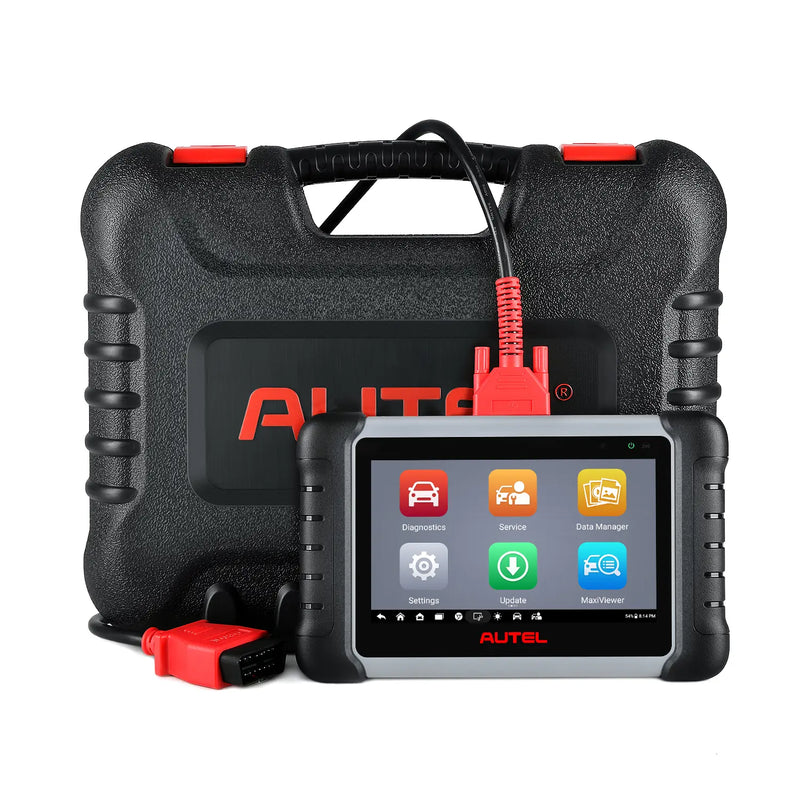
Autel MK808S / MK808Z for Broader Diagnosis and Supported Active Tests
Autel MK808Z Key Features:
- Read/erase codes on all available systems
- View and graph Live Data
- Perform bi-directional Active Tests
- 28+ advanced reset services (TPMS, Oil Reset, EPB, DPF)
- Wide Vehicle Coverage
- ...
Suitable for: Customers who require further diagnosis. The specific scope of active testing support varies by vehicle model. Please verify Ford model coverage based on your vehicle's model and year.
 22% OFF
Autel MaxiCOM MK808S / MK808Z
$499.00
2026 Autel Entry-Level Diagnostic Scanner with OE-Level All System Diagnostics, Active Tests & 28+ Service Functions
What to Bring to a Technician if P1000 Still Won’t Clear
If P1000 remains after you have followed the correct drive-cycle procedure and checked the required conditions, bring your records to a technician. Useful information includes:
- Vehicle details: Ford model, year, engine, and VIN.
- Readiness results: Autel screenshots showing which monitors remain incomplete, preferably before and after driving.
- Diagnostic information: Stored and pending codes, available freeze-frame data, and relevant live-data recordings.
- Recent work: Battery replacement or disconnection, code clearing, PCM updates, and other repairs.
- Driving history: The procedure you followed, starting conditions, and whether monitor status changed.
Avoid clearing codes before the appointment unless instructed. Preserving the data helps the technician investigate whether a monitor’s operating conditions are unmet, readiness is being reset, or a related fault needs diagnosis. If an emissions-test deadline is approaching, mention it when booking.
Summary
The Ford P1000 code indicates that one or more OBD-II monitors have not completed their diagnostic tests. If the P1000 code persists after driving, the next step is to identify which monitor(s) are not ready and why. Use an Autel scan tool to check individual monitor readiness, separate "Not Ready" from "Not Supported," and review any stored or pending codes.
Compare i/m readiness before and after the drive cycle, check for resets or missing conditions, and investigate specific monitors like EVAP, catalyst, or oxygen sensors as needed. Bring detailed records to a technician if the issue persists.


