




![IM608 PRO II Full Kit<br>[2-Year Free Update]](http://www.obdprice.com/cdn/shop/files/Autel_IM608S_II_Full_Kit_1_600x600.webp?v=1755662636)

![IM508S PRO<br>[2-Year Free Update]](http://www.obdprice.com/cdn/shop/files/Autel_MaxiIM_IM508S_Pro_600x600.webp?v=1755662755)
![IM508S<br>[2-Year Free Update]](http://www.obdprice.com/cdn/shop/files/AUTEL_MAXIIM_IM508S_600x600.webp?v=1755662895)









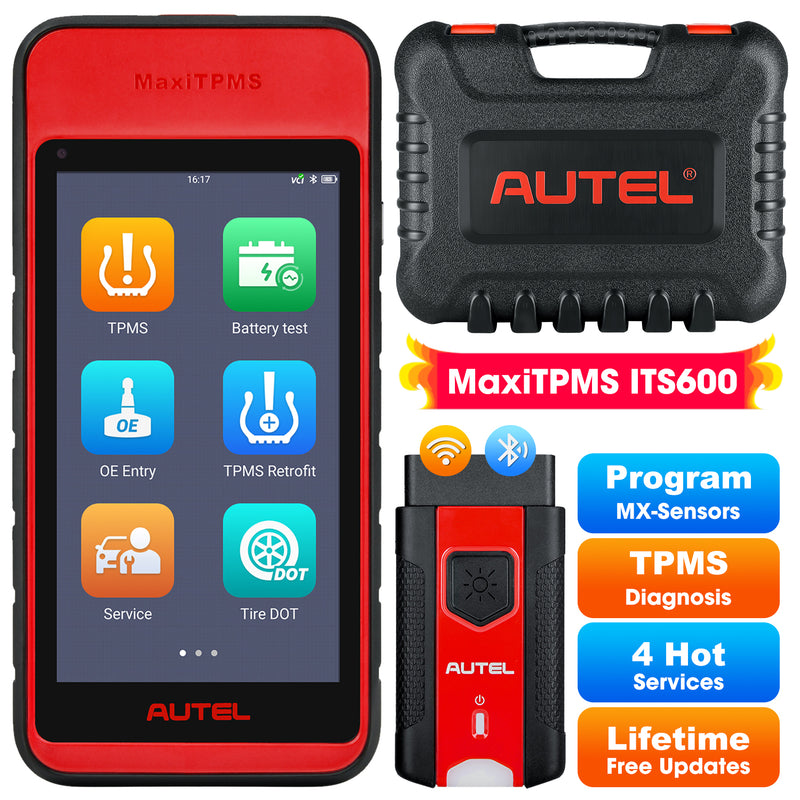
When the TPMS light appears on your car's dashboard and you don't know why; or when you need to reset the tire pressure monitoring system after changing or repairing a tire, you often need a TPMS diagnostic tool to help you solve these problems. The Autel MaxiTPMS ITS600E is a wireless Android-based TPMS service scanner with a 5.5-inch touchscreen.
So, what exactly can the Autel ITS600 do? Let's take a brief look at its functions and features.

1. Complete TPMS Solutions

The most advanced feature of the Autel ITS600 is its comprehensive TPMS functionality. It not only provides TPMS checks and diagnostics, but also sensor programming and TPMS relearning capabilities, making it fully adaptable to various TPMS faults.
- TPMS Check: Check TPMS by displaying sensor location, sensor number, tire pressure, tire temperature, sensor frequency, and sensor battery information. It can detect whether the TPMS sensor is damaged, making it easier to replace it later.
- TPMS Diagnostics: The Autel ITS600E can diagnose TPMS systems, display fault codes, and also perform fault code clearing and real-time data display.
- Sensor Programming: The Programming function allows users to program the sensor data to the MX-Sensor to replace existing sensors with low battery life and ones that are no longer functioning. This device offers four programming methods when programming MX-Sensor: Copy by Activation, Copy by OBD, Copy by Input and Auto Create.
- TPMS Relearn: This function is used to transfer new sensor IDs into the vehicle ECU for sensor recognition. Three major methods are available for relearn process: OBD Relearn, Automatic Relearn and Stationary Relearn
- Wear Detection: The wear detection is for detecting wear status of tire tread and/or brake disc, which contains four types of checks, including All tread check, Quick check, Single check, and Brake disc check operations. The wear detection function is designed to be performed by using the TBE200 device (hereafter referred to as TBE device)
2. TPMS Retrofit

The Autel ITS600 supports TPMS retrofitting functionality. Retrofit is needed to be performed if your vehicle is not installed with TPMS system by default. Tap on the TPMS Retrofit application button on the MaxiTPMS Job Menu to access the function. You can refer to the steps below to perform TPMS modification. However, it is worth noting that not all vehicles support this function.
- Step 1: Tap the TPMS Retrofit icon.
- Step 2: Select the manufacturer button of the test vehicle, followed by the vehicle model and year.
- Step 3: Tap OK at the bottom of the screen to confirm information of the tested vehicle. The Retrofit screen opens.
- Step 4: Simply follow the operations guide displayed on the screen, which will guide you to choose the corresponding buttons during each procedure, including the Back-up, Retrofit, and Restore button.
3. OE Entry

If the sensor's OEM part No. is known, this function is an efficient method to activate all known TPMS sensors and program specifically the MX-Sensors. The following are two typical scenarios in which this method is ideal.
- In the workshop: If the mounted sensor is faulty and the part number is known to the technician, the technician can use this method to check the original sensor, and then write the information that was retrieved into a new MX-Sensor via Programming. The newly programmed MX-Sensor is ready to replace the original sensor and be installed on the vehicle.
- In the tire shop: If a customer needs to replace one or more tires and sensors, or purchase a large amount of sensors for one vehicle model and the OEM part No. of this model is known, this function can be used to program up to 20 sensors at the same time.
4. Four Basic Reset Services

Autel MaxiTPMS ITS600 automotive diagnostic scanner not only provides you lifelong free TPMS software but is also specially designed with 4 FREE commonly used maintenance service functions to provide quick access to the vehicle systems for various scheduled reset and maintenance tasks.
- Oil light reset
- Electronic brake service
- Battery registration
- SAS Calibration Service
Note: All systems diagnostics and 24+ maintenance services software available with Pro Upgrade purchase
5. Tire DOT Function

The Autel ITS600 offers more comprehensive and professional management and querying of tire information via the "Tire DOT" button, including the following expanded functions:
- Tire Registration: This function allows users to enter or scan the tire's DOT number to create a complete tire file, facilitating later maintenance, tire rotation, and servicing record management. This is particularly suitable for repair shops and fleets.
- Tire Recall Lookup: users can quickly verify whether a tire is within the official recall scope based on DOT information, promptly identifying potential safety hazards and preventing accidents caused by continued use of problematic tires, thus improving driving safety.
- Tire Age Check: This function automatically parses the production date from the DOT number, helping users intuitively determine whether the tire is approaching or exceeding its recommended service life
Final thoughts
After going through all the functions of the Autel ITS600, we can see that it is a powerful and practical TPMS tool. It helps users activate, program, relearn, and diagnose tire pressure monitoring systems in a simple and efficient way.
Interested in adding this professional TPMS solution to your toolkit? You can find the Autel ITS600 with special offers at the OBDPRICE Store.
 $170 OFF
Autel MaxiTPMS ITS600(E)
$599.00
TPMS Relearn Tool, TPMS Programming Tool Activate/Relearn All Sensors, TPMS Diagnostics, 4 Reset Functions (Oil Reset, BMS, SAS, EPB), Auto VIN (Free Update)
FAQs
Below are some of the most common questions about Autel ITS600:
What's the difference between Autel ITS600, ITS600(E), and ITS600 Pro?
Autel ITS600E and Autel ITS600 are the same product, but they are named differently by different dealers. As an upgraded version, Autel ITS600 Pro improves the content of service reset and system diagnosis, and adds the ability to directly print data results to further facilitate the work of mechanics.
Does Autel ITS600 need Wi-Fi?
Yes. The ITS600 needs Wi-Fi for several TPMS operations, including software updates, TPMS Programming (as it often needs to connect to an online database), and device registration.
Can Autel ITS600 program OEM TPMS sensors?
NO.The TPMS programming function of the Autel ITS600 requires the Autel MX-Sensor. Because different brands of TPMS sensors have different and undisclosed programming protocols, the Autel ITS600 can only read or activate sensors from other brands, but cannot program them.


