




![IM608 PRO II Full Kit<br>[2-Year Free Update]](http://www.obdprice.com/cdn/shop/files/Autel_IM608S_II_Full_Kit_1_600x600.webp?v=1755662636)

![IM508S PRO<br>[2-Year Free Update]](http://www.obdprice.com/cdn/shop/files/Autel_MaxiIM_IM508S_Pro_600x600.webp?v=1755662755)
![IM508S<br>[2-Year Free Update]](http://www.obdprice.com/cdn/shop/files/AUTEL_MAXIIM_IM508S_600x600.webp?v=1755662895)









Learning how to reset TPMS sensors can save time and money—plus, it’s easier than we think! Whether we’ve bad TPMS senors or just got a new one, this step-by-step guide will walk us through the process. Let’s dive in and get our TPMS sensor working in no time!

What are the TPMS and TPMS Sensors?
TPMS stands for Tire Pressure Monitoring System. It is a crucial system for detecting the condition of a car's tires, and tire pressure sensors are an essential component of this system. Thanks to the TPMS sensors, we can monitor tire pressure data in real time on the car's dashboard. Furthermore, the system can alert the driver to abnormal tire pressure through warning lights.
TPMS is divided into direct and indirect types. The most common type is the direct type, which is the method we will mainly introduce today. It involves placing TPMS sensors on each tire to directly measure tire pressure and temperature, and then using a wireless transmitter to send the information from inside the tire to the vehicle system. The display screen will then show the tire pressure data for each tire.

Tire Pressure Monitoring System
Common Types of TPMS Sensors
-
Valve type tire pressure monitoring sensor
The most common TPMS sensor is the valve stem type. This type of TPMS sensor is used with valve stems made of different materials, including rubber and metal. In addition, TPMS sensors most commonly operate on frequencies of 315 MHz (primarily in North America) and 433 MHz (primarily in Europe), though some vehicles use both.
-
Belt tire pressure monitoring sensor
Belt TPMS sensors are commonly found in some Ford, Lincoln, and Mercury vehicles, as well as older Corvette sports cars. These sensors are fixed to the inside of the wheel via a metal belt.
Before We Start: Things to Know
Before we dive into resetting TPMS sensors, there are a few important things to keep in mind.
Vehicle Model and Year Requirements
Not all cars are the same. Different makes, models, and years might need different types TPMS sensors and reset methods.
Always check your vehicle’s manual or the manufacturer’s guidelines to make sure everything’s good to go.
Tools We’ll Need
Depending on the method, we might need extra TPMS sensor, a professional TPMS tools, or even a smartphone app. We need to make sure all the right tools are ready before we begin.
Safety Precautions
When resetting, we need to avoid losing control of our vehicle or setting off false alarms. Please follow each step carefully and stay aware of our surroundings to prevent any problems.
Now that we know what to expect, let’s dive into the different 3 methods for resetting our TPMS sensors.
Method 1: Use the TPMS Reset Button
Wondering how to reset your TPMS sensors yourself? It’s totally doable for lots of cars, especially older ones or those with simpler systems. Here’s how you can do it step-by-step.

TPMS Reset Button
Before You Start:
Check if Your Car Works with TPMS reset button. Not every car allows using TPMS reset button. To see if yours is good to go, check if your car’s manual mentions it or find out more about specific car brands and resetting needs here.
Steps:
1. Inflate the Tires(If Needed)
Please ensure all tires are inflated to the recommended pressure in your vehicle's owner's manual. Ensure all four tires have adequate and correct pressure before proceeding with the next steps.
2. Turn the Ignition to the “ON” Position.
After ensuring that all four tires are within the normal pressure range, turn on the car's ignition switch, but do not start the engine. This is to ensure that the TPMS sensor, being an electronic component, needs to be powered to communicate with the car's ECU.
3. Press and Hold the Reset Button Until the TPMS Light Llinks 3 Times.
After turning on the ignition switch, press the TPMS reset button until the TPMS warning light on the instrument panel flashes three times, then release the button to reset the TPMS.
4. Start the Engine and Drive for 20 Minutes.
After resetting the TPMS sensor, start the engine and drive the car at highway speed for 20 minutes to complete the reset.

After resetting the TPMS sensor, drive the car to conduct an inspection.
Method 2: Drive and Auto-Reset
For vehicles without a reset button:
- Drive at 50 mph (80 km/h) or faster for 10+ minutes.
- The TPMS system will reset during your next start cycle.
Method 3: Use an OBD2 TPMS Tool (Recommended)
Some cars just won’t let you do auto-reset TPMS sensors or use the TPMS reset button — no matter how many YouTube videos you watch.
In that case, you’ll need a professional TPMS tools. These devices hook up to your car’s OBD-II diagnostic port and “tell” the car’s computer to recognize the new TPMS sensors.
We mainly work with two types of Autel TPMS tools:
1. Autel MaxiTPMS ITS600(E) – TPMS Relearn/programming Tool
2. Autel TS series (MK906S PRO II TS) – used with VCI accessories for more advanced resetting service and diagnostic functions.
Here’s a quick look at the Autel TPMS tools and matching accessories:
| Autel TPMS Tools | TPMS Tools Accessories |
| Autel MX808S-TS | Autel MaxiTPMS TBE200(E) |
| Autel MP808Z-TS | Autel TPMS MX-Sensor (Metal Stem) |
| Autel DS808S-TS | Autel MX TPMS Sensor (Rubber Stem) |
| Autel MX900-TS | |
| Autel MK900-TS | |
| Autel MP900-TS | |
| Autel MS906 Pro-TS | |
| Autel MK906 Pro-TS | |
| Autel MK906S Pro II TS | |
| Autel TS900 | |
| Autel TS501 Pro | |
| Autel TS508WF | |
| Autel ITS600 |
Now, let’s break it down — how to reset TPMS sensors with each tool.
Using an Autel TPMS Tool
Before you start:
- Check compatibility: Make sure the tool supports your car model. Autel covers a lot of vehicles, but it’s always safer to confirm.
- Get the right TPMS sensor: The new TPMS sensor must match your vehicle type.
- Charge the car battery: A dead battery mid-process can mess up programming.
- Maintain proper tire pressure: Before starting the reset, ensure that the pressure values of all four tires are within the normal range.
Steps:
1. Connect the TPMS tools:
Plug it into your car's OBD-II port and switch the ignition to "ON" (don’t start the engine).
2. Open the TPMS menu:
On most units, that's under the "TPMS" function.
3. Follow the prompts:
The tool will walk you through steps like:
Use TPMS tools to approach each TPMS sensor
Relearn and Reset TPMS Sensors
4. Confirm success: The tool will display a success message.
5. Check all TPMS sensors data: Check if the TPMS indicator light is off and if all TPMS sensor values are displayed normally.
No matter which Autel TPMS tool you choose, you’ll save time, cut down on guesswork, and get reliable results every time — whether you’re resetting one car or managing a shop full of vehicles.
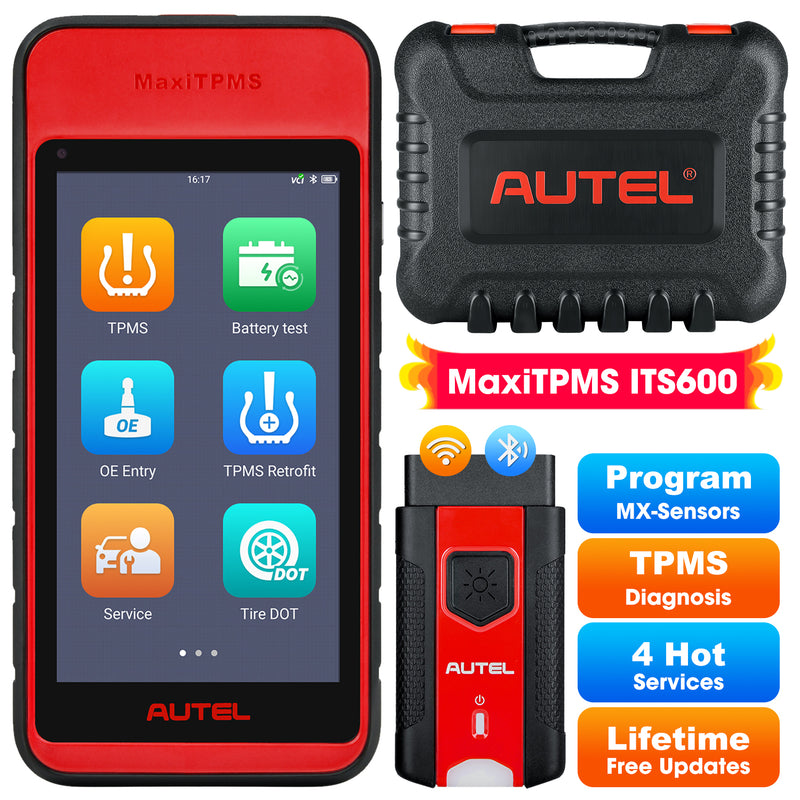
Autel ITS600(E)
TPMS Relearn Tool, TPMS Programming Tool Activate/Relearn All Sensors, TPMS Diagnostics, 4 Reset Functions (Oil Reset, BMS, SAS, EPB), Auto VIN

Autel MK906S Pro II TS
2025 TPMS Functions ECU Coding | Bi-directional Control | 36+ Reset Services | Upgrade Ver. OF MS906 PRO-TS/ MS906 PRO/ MS906TS/ MS906BT
Using the Autel MaxiTPMS ITS600(E) Programming TPMS Sensors
The Autel ITS600 scanner not only has the essential complete TPMS diagnostic, sensor programming, sensor relearning, sensor activating/ reading functions but also added user-friendly tire functions, VINscan for quick vehicle identification, TPMS module retrofitting, four common maintenance services, etc.
This one’s a bit more beginner-friendly and portable.
Steps:
1. Power on the ITS600(E) and connect it wirelessly to your car’s OBD port using the included VCI.
2. Select the automatic VIN function to automatically identify the vehicle's brand, model, production year, and other information.
3. Use the ITS600(E) to check and activate the TPMS sensors on all four wheels, then proceed with the diagnostic functions.
4. Select the programming function to program the missing TPMS sensor data via the OBD copy function.
5. Complete the TPMS sensor programming and drive the car for a period of time to ensure that the TPMS light goes out and the TPMS sensor readings are normal.
Here’s a video walkthrough
The ITS600 makes the process fast, straightforward, and user-friendly — whether you’re a pro locksmith or just getting started.
Final Thoughts
With our step-by-step guide, you've learned how to do it yourself and save both time and money. Resetting TPMS sensor is simple once you know the steps, but it’s important to follow the right process. If you’re unable to do it yourself, don’t hesitate to seek professional help to avoid errors.
Ready to reset your TPMS sensors? Explore our range of autel TPMS tools for hassle-free programming!


Leave a comment