




![IM608 PRO II Full Kit<br>[2-Year Free Update]](http://www.obdprice.com/cdn/shop/files/Autel_IM608S_II_Full_Kit_1_600x600.webp?v=1755662636)

![IM508S PRO<br>[2-Year Free Update]](http://www.obdprice.com/cdn/shop/files/Autel_MaxiIM_IM508S_Pro_600x600.webp?v=1755662755)
![IM508S<br>[2-Year Free Update]](http://www.obdprice.com/cdn/shop/files/AUTEL_MAXIIM_IM508S_600x600.webp?v=1755662895)









Brake pads play a vital role in a car's braking system. However, as time passes and the car is used, they gradually wear out, affecting braking safety. Therefore, regular replacement of brake pads is an important measure to ensure driving safety.
The electronic parking system is more complex than the manual brake. The Autel scanner can automatically retract and reset the motor, avoiding the risks of manual operation. It can also diagnose the electronic parking system and provide relevant data to improve maintenance efficiency.

Why You Need an Autel Scanner for Brake Pad Replacement
Mandatory Decoding Requirements for Electronic Parking Brake Systems
For vehicles equipped with electronic parking brakes, the brake cylinder pistons are managed by the Electronic Control Unit (ECU). When replacing brake pads, the pistons must be reset using a decoder; manual operation is not possible.
The Autel scanner, as a professional diagnostic tool, can complete this critical step, preventing brake pad reset failure or brake discontinuity due to a lack of decoding.

Linked Replacement and Resetting of Brake Sensor Cables
For mid- to high-end models, the brake sensor cables will trigger an alarm as the brake pads wear. Brake pad replacement generally requires simultaneous cable replacement.
Some models (such as Mercedes-Benz and BMW) require a dedicated computer for decoding and resetting after replacement; otherwise, the instrument panel will display persistent false alarms. The Autel scanner can quickly reset the sensor cables, eliminating manual omissions or errors.
Double Guarantee of Safety and Efficiency
Failure to use a decoder may result in improper brake pad installation, leading to abnormal brake force distribution, shortened brake pad life, and even safety hazards.
Professional tools accurately match vehicle specifications, reducing the risk of rework due to improper operation and improving repair efficiency.
In summary, the Autel scanner is not just a "need," but an essential tool for ensuring safe and compliant repairs, especially for vehicles with a high degree of electronic functionality.

The working process of the electronic parking brake system is very complex.
Autel Scanner Recommendation
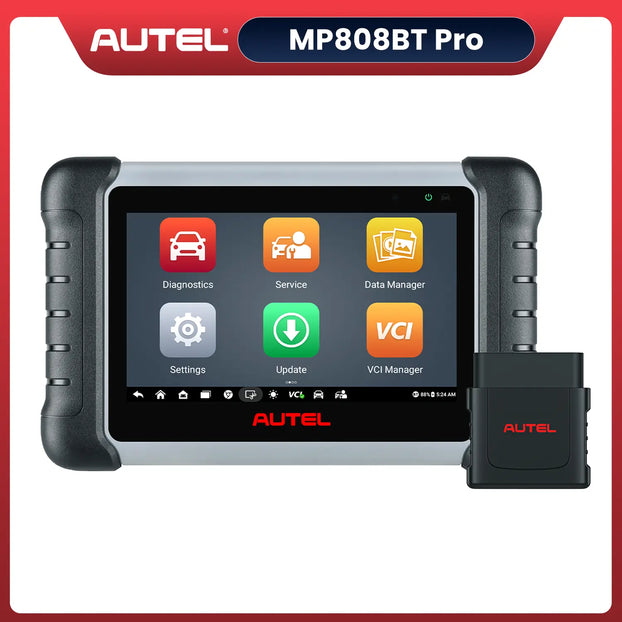
Autel MaxiPRO MP808BT Pro
The Autel MaxiPRO MP808BT PRO is a powerful wireless diagnostic scanner with OE-level coverage and 37+ special functions.
It supports EPB service for safe brake pad replacement, online ECU coding, and bi-directional control. Compatible with over 80 vehicle makes, the MP808BT PRO runs on Android 11, offers AutoVIN, FCA AutoAuth, and includes two years of free updates, making it ideal for both professionals and DIY users.
Autel MaxiPRO MP808BT Pro
$589.00
[2-Year Free Update] Wireless Diagnostic Scanner | 2025 New Advanced ECU Coding Bi-Directional Control OBD II Scanner | Upgrade Ver. of MP808/MP808BT
Shop NowAutel MaxiSys MS906 Pro
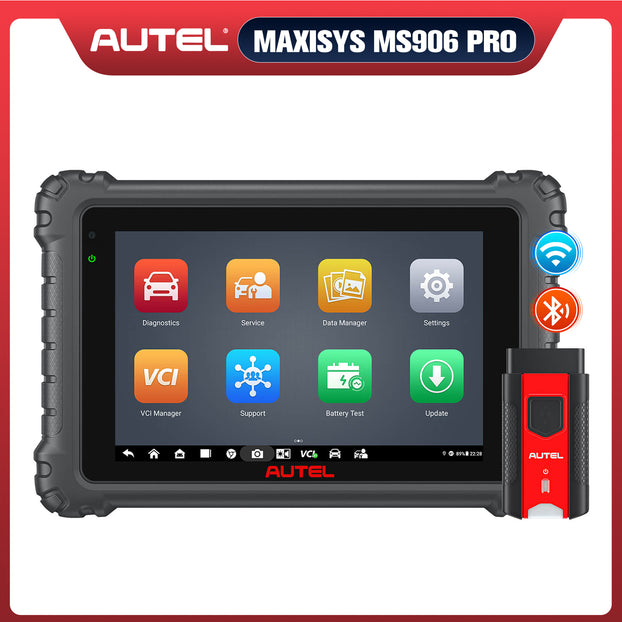
The Autel MaxiSys MS906 Pro is a professional diagnostic scanner featuring OE-level coverage, bi-directional control, and ECU coding. It supports over 80 vehicle makes, including 2025 models. With EPB (Electronic Parking Brake) service, users can safely retract brake calipers and reset the brake system when replacing brake pads.
Running on Android 10 with an 8-inch display, it offers 31+ maintenance functions, AutoVIN, and DoIP/CAN FD protocols for faster, more precise vehicle diagnostics.
Autel MaxiCOM MK908 II
The Autel MaxiCOM MK908 II is an upgraded professional diagnostic scanner offering OE-level all-system diagnostics, ECU coding, and bi-directional control. It supports over 80 vehicle makes and features EPB (Electronic Parking Brake) service, allowing safe brake pad replacement and caliper reset.
Equipped with a 10.1-inch display, Bluetooth VCI, and ADAS calibration capability, the MK908 II delivers fast, precise diagnostics. It also supports AutoVIN, oil reset, BMS, DPF, and other key maintenance functions for professional technicians and repair shops.

Tools and Preparation Before You Begin
- A suitable Autel scanner
- New brake pads
- Tire removal tools
Before you begin, make sure the vehicle is parked in a flat, open area for easy operation and safety. Secondly, make sure the Autel scanner is fully charged, as it may take a long time to operate.
Step-by-Step Guide to Replace Brake Pads with an Autel Scanner
Using an Autel scanner (such as the Autel MS906 Pro or MK908 II) makes replacing brake pads on vehicles with electronic parking brakes (EPB) safer and more efficient. Here are the detailed steps:
Step 1: Preparation
Before beginning, ensure the vehicle is parked on a flat surface and the parking brake is engaged. Gather the necessary tools, such as a screwdriver, wrench, new brake pads, and an EPB-enabled Autel scanner.
Step 2: Connecting the Autel Scanner
Connect the scanner to the vehicle via the OBDII interface. Start the scanner and select the vehicle make and model. The Autel scanner will automatically identify the vehicle (AutoVIN) and establish communication.
Step 3: Entering EPB Service Mode
From the main menu, select "Service" → "EPB" → "Repalce brake pads." This function releases the EPB system, automatically returning the rear brake caliper pistons to their original position, preparing for brake pad replacement.

Select Replace brake pads to proceed to the next step.
Step 4: Replacing Brake Pads
Turn off the ignition. Remove the old brake pads and calipers and carefully install the new ones. Ensure the pads are properly seated and all screws are tightened.
Step 5: Exit Maintenance Mode
Turn the ignition back on, return to the Autel scanner screen, and select "EPB → Close Maintenance Mode." This will reactivate the electronic parking brake system.
Step 6: Perform a Function Test
After the replacement is complete, use the scanner to perform an "EPB Calibration" or "Brake Test" to ensure the system is operating properly and there are no fault codes. Finally, take a test drive to confirm that the brakes are functioning properly.
You can refer to the video below for how to use the MK908pro to replace the brake discs and brake pads on a 2012 Renault Megane GT line, but the specific steps may vary depending on the model of the car and scanner.
Final Tips for Safe Brake Maintenance
To ensure your vehicle's braking performance and driving safety, replacing brake pads is only one part of maintenance. Here are some helpful safety tips:
-
Use high-quality brake pads
Choosing brake pads that match or exceed the original manufacturer's specifications can reduce unwanted noise, improve braking sensitivity, and extend the vehicle's lifespan.
-
Check the brake fluid regularly
Brake fluid absorbs moisture at high temperatures and after prolonged use, resulting in reduced braking performance. It is recommended to change the brake fluid every two years or 40,000 kilometers.

Check the condition of the brake fluid regularly.
-
Monitor brake disc wear
When replacing brake pads, always check the thickness and wear of the brake disc. If there are severe grooves or uneven thickness, the disc should be replaced or reground at the same time.
-
Avoid frequent abrupt braking
Frequent abrupt braking can cause the brake system to overheat, prematurely deteriorate the brake pads, and even cause brake fade. Maintaining a steady driving posture can effectively extend the life of the brake system.
-
Perform regular inspections with an Autel scanner
Using a smart scanner like the Autel MS906 Pro or MK908 II, you can regularly perform EPB calibration, ABS system inspections, and brake pressure tests. This can identify potential problems early and ensure your brake system is always in optimal condition.
Conclusion
Regular inspection and replacement of brake pads is crucial. Pad wear can increase braking distances and affect driving safety. Using an Autel scanner can diagnose your vehicle's electronic parking system and guide brake pad replacement, playing a vital role in vehicle diagnosis and maintenance.


